
The Dvorak Simplified Keyboard

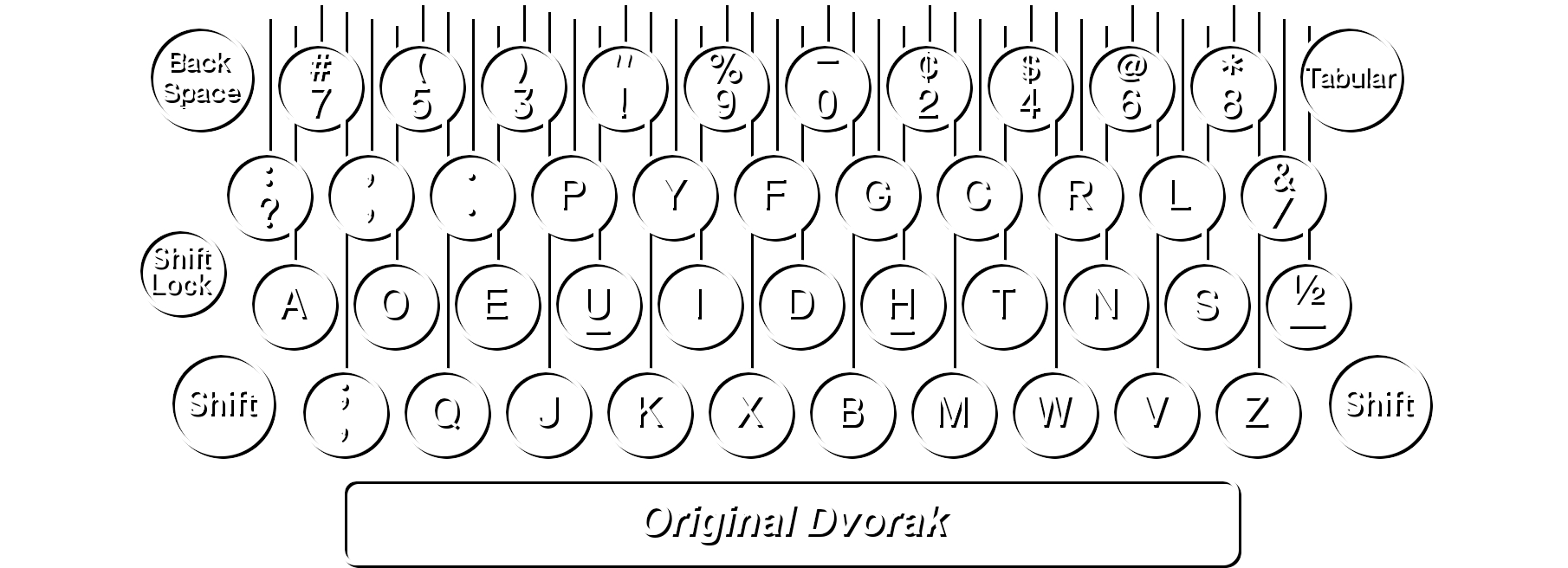

A Scientific Two-Handed Letter Arrangement
For about 90 years, alphanumeric keyboards with a human-factored letter arrangement, known as the Dvorak, have been produced (Dvorak et al. – U.S. Pat. No. 2,040,248 – May 12, 1936). Designed for comfortable typing with maximum efficiency, letters are placed to preclude awkward fingering, decrease errors, lessen fatigue, and increase typing speed.
The inventors, August Dvorak and William Dealey, analyzed typing behavior to understand how different motions affect headway. They determined that an overlapping succession of two-handed keystrokes is efficient, and a succession of stabbing one-handed finger taps is ineffective. They invented a letter scheme that supports a “fluent rhythm of two-handed overlapping keystrokes.”
In the Dvorak keymap, the five basic vowels are placed under the resting left hand across from fifteen consonants assigned to the right hand. Those right-hand consonants are a subset of the more frequently occurring (excluding the letter “Z”). This scheme sets up a comfortable back-and-forth cadence between the hands when building syllables. The “rhythmical flow of typing induced” engenders an increase of writing speed.
Letters are sequenced in the two-handed Dvorak keyboard with regard for frequency of use and relative finger strengths. High-use letters reside beneath the resting hands. Home-row includes the five basic vowels under the left hand and five of the most frequently used consonants under the right hand. Workloads are aptly distributed between the individual fingers of the two hands.
The efficacy of a keyboard letter arrangement for writing any native language can be readily assessed. The primary factor to be considered is the relative frequency of letter occurrence found in the written language. Do those statistics agree with the ease of reach for the respective letters within the native keymap? To rephrase that… are the high-use letters intentionally placed in the easiest to reach sweet spots on the keyboard?
In reference to the bottom three rows of a conventional alphanumeric character key array: keys that are positioned in the home-row require the least effort to operate, keys positioned in the top alpha-row require greater effort to operate, and those keys located in the bottom alpha-row require the most exertion.
The following two lines list the percentage of keystrokes per alpha-row for Qwerty vs. Dvorak when typing English.
Qwerty Standard: top alpha-row 52%, home-row 32%, and bottom alpha-row 16% of typing keystrokes.
Dvorak Simplified: top alpha-row 22%, home-row 70%, and bottom alpha-row 8% of typing keystrokes.
It requires less physical effort to operate a Dvorak keyboard. A typist using the Dvorak letter arrangement performs reaches out of home-row at less than half the frequency of a typist using the Qwerty layout.
Dvorak was thoughtfully designed for writing English… Qwerty was not. When other languages that use the Latin, Greek or Cyrillic scripts are analyzed, the foregoing lists of typing keystroke percentages exhibits modest variance. That dichotomy is universal.
Ronald Earl Walker — Simplified Keyboard Proponent
Dvorak Simplified Typewriter Released Into the Wild
Dr. August Dvorak applied the science of time-and-motion studies to redesign the typewriter keyboard letter scheme. He was friends with Frank B. Gilbreth Sr. and his wife Lillian who were pioneers in that field of study. Ergonomics and human factors developed decades later from those beginnings. August Dvorak was prescient.
The Carnegie Foundation provided a grant to study how the typewriter could be improved. Dvorak worked with William L. Dealey to develop a new typewriter letter scheme for comfortable writing. A book Typewriting Behavior (Dvorak et al. – 1936) was written that explains the reasoning behind the ‘simplified’ typewriter letter arrangement.
The letter scheme has proven to be well-designed for humans to write. During the mid nineteen-thirties through the beginning of the nineteen-forties typing speed competitions were popular. Those contests were disproportionately won by Dvorak typewriter users. For a short period, Dvorak typists were banned from competing.
Barbara Blackburn, a Dvorak user, was recognized as the “World’s Fastest Typist”. Her speed records were included in the Guinness Book of World Records from 1976 to 1986. The “Typing, Fastest” category was removed in 1987.
In 1944 the U.S. Navy conducted an experiment in which Qwerty typists were retrained on the Dvorak typewriter. That wartime research was inexorably skewed by the participation of the inventor, Lieutenant Commander August Dvorak (Liebowitz and Margolis 1996). The controversial study did produce favorable results, so the purchase of 2,000 Dvorak machines was considered, but not authorized. The U.S. Treasury Department would likely have prohibited that.
In 1945 LCDR Dvorak was contacted by Colonel Robert S. Allen, a U.S. Army combat veteran who lost his right arm in an artillery attack. At the time of his injury Col. Allen was serving on General Patton’s staff. Before the war he had made his living working as a newspaper columnist. The writer was not satisfied with his ability to type one-handed on a standard Qwerty machine, so he asked the inventor for help.
Dvorak invented a typewriter keyboard letter scheme for the left hand that enabled Col. Allen to return to his prewar profession (Lewis 1946). The inventor also created a Right-handed letter scheme that is fundamentally similar.
The original Dvorak letter arrangement forces a single-hand operator to incessantly make broad side-to-side reaches. The invention of that paradigmatic two-handed letter scheme for typewriter keyboards occasioned an innate obligation to render options for single-hand typists. August Dvorak skillfully discharged that duty.
In 1982 the American National Standards Institute (ANSI) designated the Dvorak Simplified Keyboard letter arrangement as an alternative standard.
Ronald Earl Walker — Dvorak Typewriter Historian
I Write Using a Dvorak Keyboard
In 1991, I bought my first PC compatible for $1500. The device came with an Intel 80386 processor and 4 MB of RAM. At that time, it was a respectable machine. The computer was a slow DOS pig… all PCs were slow DOS pigs.
I worked with the technology for weeks and accomplished no actual work. The only true value of the device was as a word processor, so I bought a used daisy wheel printer and some inexpensive word processing software, pfs:Write.
Although it was a functional setup, I did lose the struggle to use the word processor. The Qwerty typewriter interface made writing an insufferable task.
I have utterly abhorred the standard English (US) PC keyboard letter scheme since 1969 when I realized how bad Qwerty is and decided to never use a typewriter again. Qwerty will always be the bane of my existence. My mind simply refuses to recall where letters are positioned when I use a Qwerty!
Eventually I got dial-up internet service. While surfing the internet, I found a drawing of the Dvorak keyboard. Straight away, the letter scheme made sense. I thought, “Well, at least I know where the vowels are, that’s a start.”
Forthwith, I bought a Key Tronic KB101 Plus PC keyboard for $130 and mail ordered a $50 Dvorak conversion kit (That KB101 is shown in this website’s 2nd page photo gallery). The keyboard was hardwired; I could just plug it into any PC. I learned to touch-type, in a limited fashion.
The conventional Dvorak keyboard made it possible for me to write. However, after fifteen years of using that keyboard every day, nagging pain developed in my left hand and wrist. I could not write for long periods of time.
The asymmetrical mechanical typewriter configuration is counter-intuitive. Use of that keyboard caused a Repetitive Stress Injury to my left hand and wrist.
Ronald Earl Walker — Forthright Dvorak Enthusiast
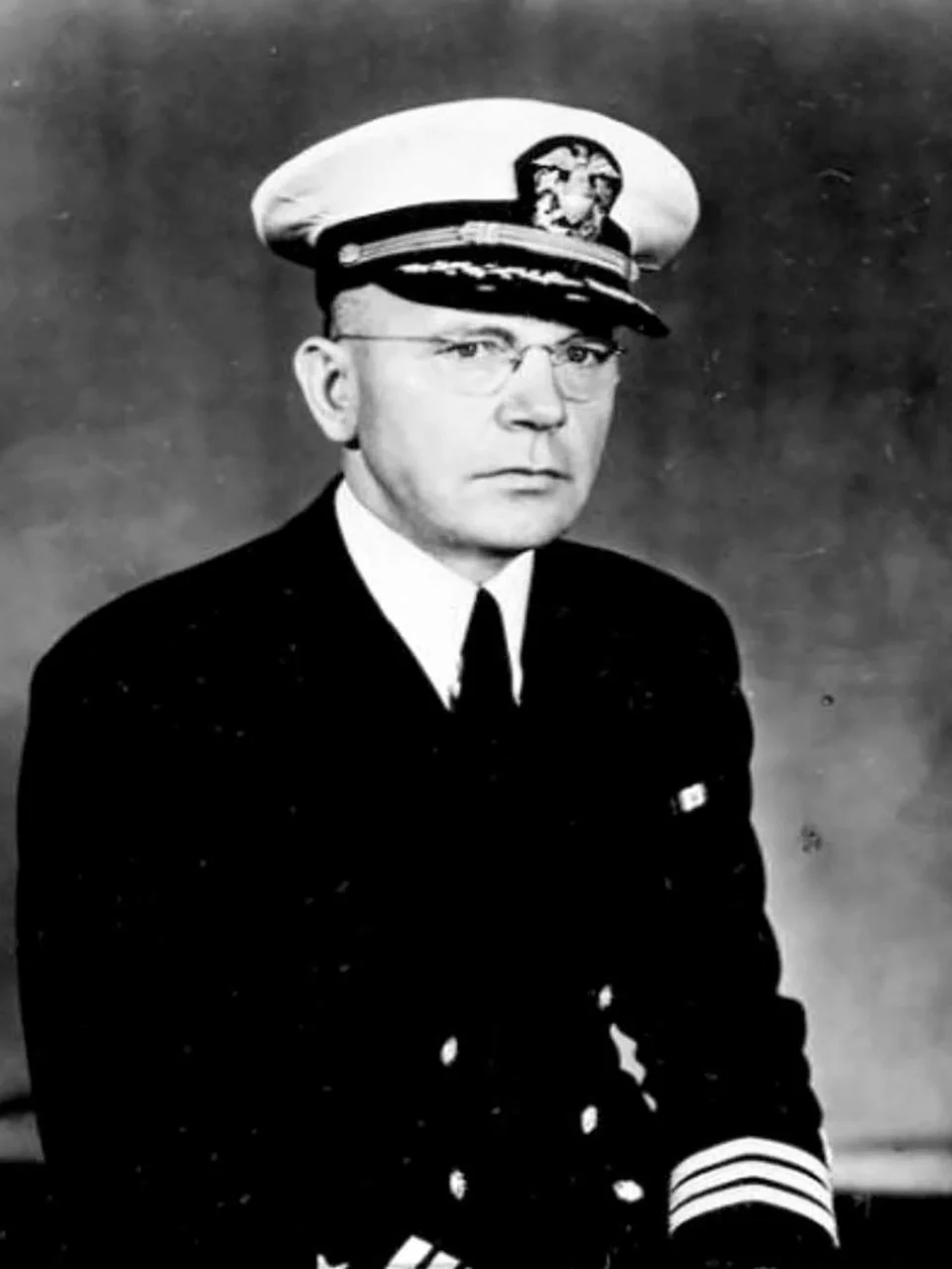
CDR August Dvorak - 1948
Fought in three wars, and continued to serve in the USNR after World War 2.
He reached the rank of Captain.
How to Navigate the PCBWay Website
Building a Dvorak 2026 starts with ordering PCBs. If you want to help spread this unique writing instrument around the world, you are invited to sell PCBs and keyboards. The Post-Mechanical Trust encourages all writerz-with-an-attitude to join us.
To buy PCBs, order some from PCBWay (minimum order is five). It takes about a week to receive my boards from China. Five days is the current record. Every order received has been of wonderful quality. Best prices… excellent work.
First: Click on the link below. On pcbway.com create a PCBWay account; this gets you a unique customer number and allows you to download files from my PCBWay+ project pages.
Second: Select a link to one of my PCBWay+ projects (found on the next two pages). Inside of the project click the “Download Gerbers” button. There are other files available in the project, download them also.
Third: Navigate to the PCBWay homepage by selecting the “PCB Prototype” button.
Fourth: Fill out the PCB Specification Selection form:
1. Length and width: Compact = 305 by 135 mm, Maximus = 350 by 125 mm, Sixty = 286 by 95 mm.
2. Quantity: The minimum order is five. Buy ten, encourage others (donate, sell or barter your surplus).
3. Solder mask/Silkscreen: I have ordered green, red, blue, and purple masks with white silkscreen.
4. All other values default correctly.
5. Click the “Calculate” button to get your estimate.
Fifth: Upload the zipped Gerber files you downloaded from one of my five project pages.
Sixth: Wait for the PCB design to be reviewed. An engineer will verify the design and approve your order. This may take some time. You may log out of your account and check back on the order later. When you log back into the PCBWay website, you will find a notification of your order’s approval and a new link to Checkout.
Seventh: Proceed to Checkout and follow the yellow brick road.
Eighth: Choose a shipping company. I always use DHL. I receive phone text updates. I opt for a no-signature delivery to my side door. DHL also handles the import fees… no worries. Tariff fees are paid during checkout.
Ninth: Pay for your order. There are international fees required. Note: the link below leads to the main page.
Tenth: Pay the US import fees if they were not pre-payed. When the shipment hits customs the carrier sends a text. You pay the fee and customs releases the package. Tariffs have been an evolving target, due diligence is required… research.
The cost of PCBWay’s products is amazingly low. It is cost-prohibitive for me to buy from a US PCB manufacturer… ten times the cost! My choice to buy high quality products from a wonderful Chinese PCB maker is a no-brainer.
Tariffs: As of May 2026 the rate in 35%. The US federal government is drowning in debt. Tariffs are the best short-term solution to keep things going. Our founding father’s placed tariffs in the hands of the executive branch.
Ronald Earl Walker — Your PCBWay Guide
Considerations: Making 3D Printed Case Sections
Is it cost-effective to take up 3D printing just to build a few keyboards? A budget medium-sized printer costs $200 to $400. Manufacturers substitute rubber wheels and nylon bushings for metal bearings. The accuracy is reduced, and the cheap printer parts wear out prematurely.
Think carefully. You probably already know someone who does 3D printing, a hobbyist with years of experience. Ask them if they could print a keyboard case for you. Barter several of your surplus Post-Mechanical PCBs or some spools of filament, they might come to terms. Pay an amateur 3D maker for their services, they will enjoy making something useful. A professional print farmer could be hired.
Truthfully, 3D printing will routinely throw you some aggravation. Earn the skill set and you will find 3D printing most satisfying. My grandfather had a woodworking hobby; he built some interesting things. I make cases for plug-n-play computer keyboards that can work with any PC in the world.
My first printer was a Prusa i3 MK3S+ that I bought as a kit. Building that printer taught me how the devices work. That knowledge made it possible for me to build a Voron Trident 350.
Upgrading the Prusa MK3S+ to a MK3.5 doubled the print speed, added Wi-Fi connectivity, and adaptive mesh bed leveling. Only Prusa Research could offer such a great upgrade… Josef Průša rules!
In May 2025, I reluctantly retired my Trident printer. It could not make a part with the fine tolerances I need. I replaced it with a Prusa MK4S.
The new printer is a high-flow machine. Case bottom sections that took 3 hrs and 15 mins. to print crookedly on the Trident now print perfectly in 1hr 45 mins using the new Prusa. The company makes fast and accurate 3D printers.
The High-Flow Nozzle: I use the MK4S to print case bottom sections. Those prints are always black PETG. When I tested the printer’s ability to make a top section… the part did not match up with parts made on the MK3.5. The factory default MK4S printer SPEED print settings may be too fast for the detail required. Notice: To print top sections on the MK4S, changing the print settings to STRUCTURAL would produce better fitting parts.
Single-Channel Nozzles: I use the MK3.5 to print case top sections. The case tops are printed in any color desired, so changes of filament color are regularly required. The cold-pull method for cleaning the nozzle between color changes works well. Suggestion: After a cold-pull and change of filament color, print a small purge object.
Ronald Earl Walker — Home-Built Keyboard Case Maker