
The Qwerty Standard Letter Scheme

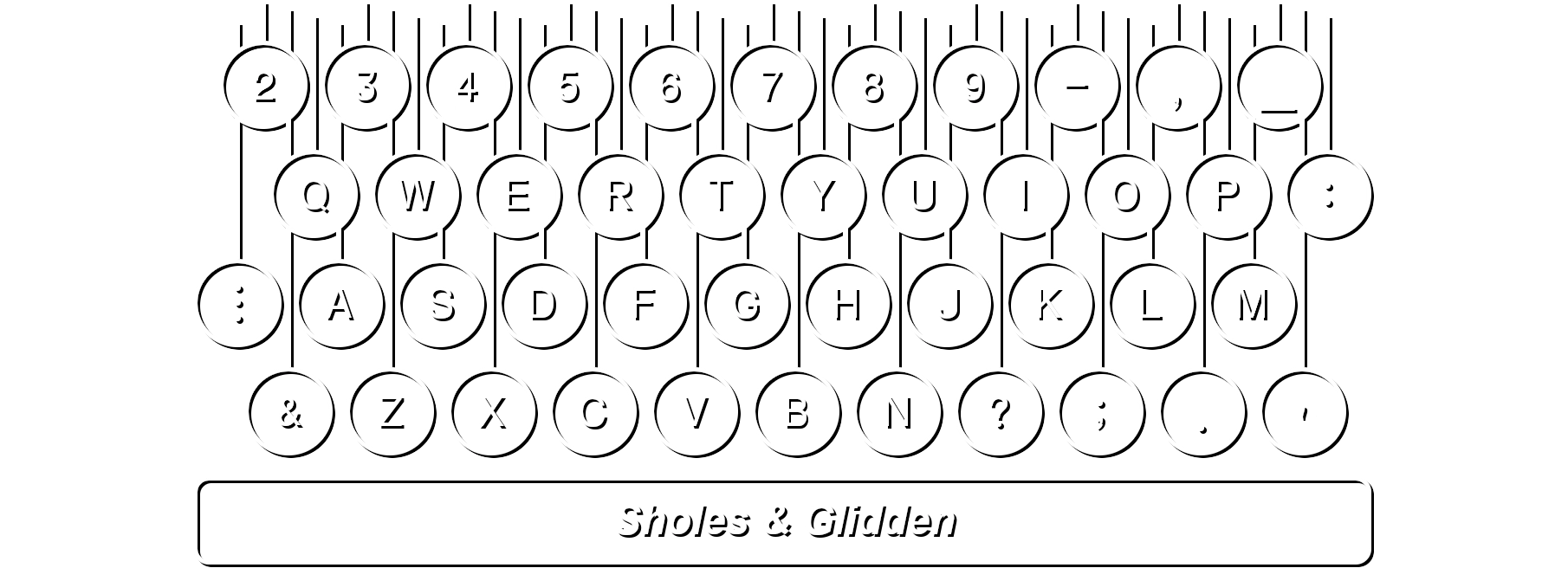

Telegraph Operators Guided the Design of Qwerty
In 1981 IBM held 62% of the mainframe computer market. On August 12th, the corporate giant announced the IBM Personal Computer, legitimizing microcomputers in the office. On that day in 1981 the ubiquitous office typewriter became obsolescent, and skilled typists became keenly aware of that fact.
Because the new technology leveraged the existing skill set that all typists possessed, it was readily brought into prevalent use. That entrenched expertise was based upon an unwieldy keyboard with an inapt letter arrangement invented over a century earlier for the first successfully marketed typewriter: the 1874 Sholes & Glidden.
The Qwerty typewriter keymap (Sholes – U.S. Pat. No. 207,559 – August 27, 1878) is the outcome of an inadequate design process. The inventors were focused on perfecting the mechanism, while the principal business partner was pushing for a payoff on his investment. A human-factored letter sequence was neither conceived nor developed.
Many believe that the Qwerty was contrived as a makeshift work-around. The prototype machines suffered a high rate of jams due to sluggish mechanisms. The typebars had no return springs, relying upon gravity to return the typebars to battery. The type slugs recurringly became entangled when keys were struck in rapid succession.
The keyboard letter sequence was originally alphabetical. With no hope of perfecting the machine’s mechanism in a timely fashion, the letters were reorganized to reduce the rate of jamming, making the Type-Writer tolerably serviceable. Home-row retains a long remnant of the alphabetical letter sequence: “D, F, G, H, J, K,” and “L”.
Researchers have found evidence that Qwerty evolved to satisfy telegraph operators (Yasuoka and Yasuoka 2010). Professionals in various fields evaluated typewriter prototypes. Stenographers rejected the invention as a threat to their profession. Telegraphers found the machines to be almost useful for transcribing Morse code messages. After modifying the letter scheme as requested by a series of telegraphers, the layout had nearly evolved into Qwerty.
One example of the Morse code transcribers’ influence is placement of the “Z, S,” and “E” keys. In Morse code “Z” can be confused with the bigram “SE” when either one occurs at the beginning of a word. Telegraphers would hover over those three letters on the keyboard until the letter or bigram was recognized within the context of a word.
Another example of the telegraphers’ guidance is the placement of the letters “I” and “O”, which stood-in for the numerals “1” and “0” that were missing on the archetype. The two letters were positioned just past the numeral “9” to spell out “IO”, making the never-ending task of typing both dates and times easier, e.g., I879 or I2:O8.
In March 1873, the chief inventor of the typewriter, Christopher Latham Sholes, took a lump sum of $12,000 for his interest in the machine. He continued to improve the typewriter until his death in 1890. His last patent was issued posthumously (Sholes – U.S. Pat. No. 568630 – September 29, 1896). It disclosed a new human-factored letter scheme.
Ronald Earl Walker — Qwerty Keyboard Chronicler
The Production of Mechanical Typewriters Begins
The mechanical typewriter was an unreliable contrivance, nowhere near perfected, when investor James Densmore entered negotiations with E. Remington & Sons. The prominent gunmaker had the skills and resources to produce the typewriter on a commercial scale. Densmore secured exclusive marketing rights in lieu of royalties.
On July 1st, 1874, Remington began shipping the Sholes & Glidden typewriter… it was a barely usable machine. After Remington engineers had finalized the keyboard letter sequence, all the letters needed to write the word typewriter resided in the top alpha-row. Some historians dismiss this expedience as a fortunate happenstance.
That first Qwerty machine could only print capital letters. In 1878 an improved machine, the Remington No. 2 was produced that would print either upper- or lower-case letters by moving the carriage with a “shift” lever.
In 1880 subsequent manufacturers entered a market where all typists possessed a Qwerty skill set. Although a few typewriter makers succeeded in marketing machines with disparate keyboard and letter arrangements, most chose to produce competing Qwerty models. The technology was slowly adopted, and the industry had some diversity.
The major Qwerty manufacturers formed the Union Typewriter Company trust in 1893, fixing the price of a standard machine at one hundred dollars. Moreover, the trust established overseas agencies for the member companies to spread the Qwerty gospel around the civilized world. By the early 20th century an international market for typewriters had developed in which diverse countries used the Qwerty keyboard scheme or a variant thereof.
A notable alternative to Qwerty was the American-made Blickensderfer, introduced at the 1893 World’s Columbian Exposition in Chicago. During the company’s peak years of 1903 to 1907 over 10,000 typewriters a year were sold on several continents in numerous languages. The keyboard’s letter scheme DHIATENSOR was human-factored.
Any typewriter manufacturers that enjoyed success marketing machines with unique keyboard layouts were dealt a mortal blow by the outbreak of war in 1914. Involved governments made the production of military equipment a priority. Some typewriter makers were forced to retool their factories, switching production over to war goods.
George C. Blickensderfer converted most of his factory over to war production. The inventor died in August 1917. The company he founded was sold off in 1919 and was sold off several more times. The Remington Typewriter Company acquired the company’s assets in 1926. A Blickensderfer/Qwerty hybrid was last produced in 1928.
During the Great War reduced typewriter production was commandeered to serve the participating governments. The Allied and Central Power governments exclusively awarded wartime contracts for typewriters to the producers and procurers of Qwerty variants. During wartime the value of used Qwerty machines and the variants skyrocketed.
The die was cast… After the sanguinary struggle ended, a young generation of experienced Qwerty typists flooded the workforce. The odd letter arrangement became the de facto standard; it is omnipresent and entrenched.
Ronald Earl Walker — Mechanical Typewriter Historian
The Qwerty... Bane of My Existence
At fifteen years of age, I learned to touch-type using my mother’s Qwerty typewriter. After two weeks of dedicated study, I successfully typed “The quick brown fox jumps over the lazy dog.” without looking. I should have been happy, I was not. At that moment my mind snapped.
I picked the typewriter up over my head and started screaming, “Who is the idiot that designed this #!$%& letter arrangement?”. That rage was the result of my intellect suffering. I had just realized that continuing to touch-type using Qwerty was impossible. At a gut level, I could not embrace the stupidity.
Typing skills might have helped raise my grades. My illegible handwriting was not given the benefit of a doubt; I felt that handwriting kept me a B student.
Although I could not make top grades because of my imperfect work, I did place in the top 5% of my class on the SAT. I often aced multiple choice tests.
During US Army basic training, my CO advanced an offer for me to attend the United States Military Academy Preparatory School. At that moment, in an odd twist of fate, I was suffering heat stroke… my brain was cooking. That offer was considered and declined. I immediately reported to sick call.
After unpleasant week at Moncrief Army Hospital with a severe URI, I lied to the doctor to get back to my unit; I was still coughing up blood.
After fulfilling my military obligation I advanced my education, till flunking out of UCF Engineering. Higher math was insuperable. Calculus has great utility. I grok the concept, but cannot practice it… I make too many little mistakes.
I realize now that I have dyscalculia and all the learning disabilities associated with it: an altered perception of time, a warped sense of spatial reality, difficulty telling left from right, meager ability to recall names/faces, dyslexia, et cetera.
My arithmetic skills are unpredictable and erratic due to number substitutions, omissions, transpositions, additions, and reversals. A career in engineering or science was never possible. I would have failed engineering at West Point.
Ronald Earl Walker — Dud Extraordinaire
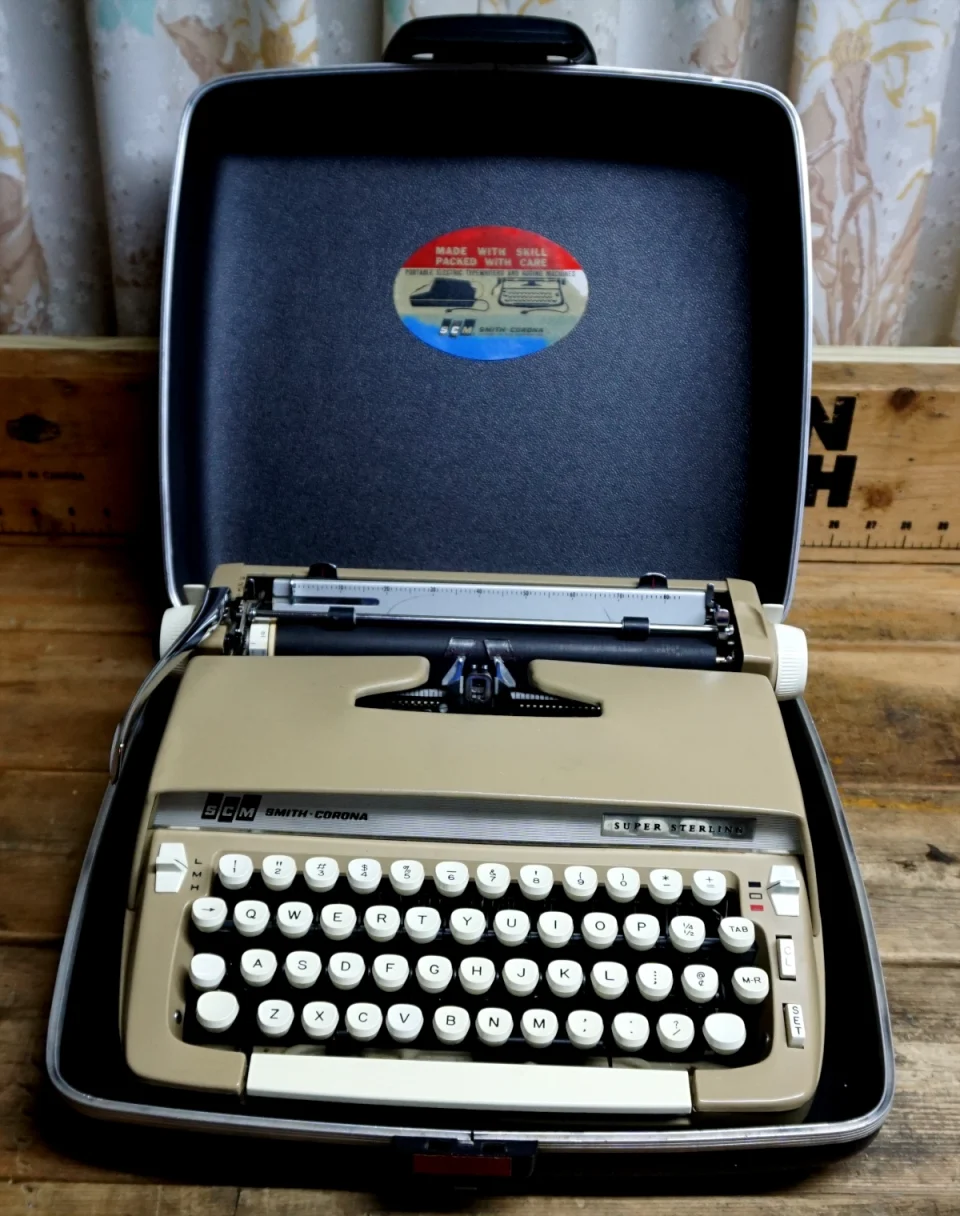
Mother’s Infamous Smith-Corona
In an unexpected fit of anger I nearly smashed this machine on the floor.
Dholydai's Guidance for 3D Makers
Deadly Serious: Do not use ASA plastic filament. Styrene fumes will kill. Never use acetone to clean a PEI sheet.
The tolerances of the case top are tight around the switches. The 3D model’s lattice structure shrinks upon cooling. The prints always fit a bit tight. Print the top sections using a 20% gyroid infill.
Note: I only use MX or MX2 keyboard switches produced by Cherry. I regret using Gateron switches on keyboards. The quality of the fit is barely acceptable; the stems are not particularly perpendicular to the switch body.
Print the bottom sections with a 20% gyroid infill. That provides for good bridging of following layers. By default, the Prusa Slicer prints a 2-layer infill between the top and bottom shells of the 2mm thick bottom deck. That allows the parts to sit flat as they print, and remain so after they cool. Solid decks with no infill will warp… I tried that!
Note: Printing a one-piece top on a large printer is impractical. When big prints go bad, lots of time and material are wasted. I designed multi-section cases that print on a medium-sized (200 mm by 200 mm) FDM printer using PETG.
Important information: Buy a UPS for each printer and computer on your farm. The UPS prevents damage to your printer and gives you time (2-3 minutes) to make an orderly shutdown. I use a 700VA and a 900VA UPS for my two Prusas. Both printers have continued through short power glitches to complete their projects.
Advice on buying UPSs: Smart UPSs are a bad investment! They often die outright or will intermittently not power-up. I have to unplug/replug (and sometimes) disconnect/reconnect the battery. Dumb UPSs work well and last longer.
Advice for Novices: Getting consistent first layer adhesion with PETG is a challenge. Use textured PEI build sheets. Elmer’s disappearing purple glue stick is a good aid to adhesion. Elmer’s is also a releasing agent, preventing cooled parts from sticking too well to the sheet. Without it, removing stuck parts will damage PEI sheets.
A thin slurry is all you need. Dab a spot or two of glue onto the sheet and spritz it with distilled water. Rub each and every dab into a slurry using clean fingers. Too thick of a slurry creates adhesion problems, too thin and parts will stick. Judge the concentration and wipe some off if required. Spritz, rub then judge again until satisfied.
Maintenance: Textured build sheets require periodic deep cleaning. The glue builds-up fouling the texture. Use a plastic brush (tooth) and scrub while running the plate under tap water. Do not use soap, that will damage PEI.
Note: The build sheet must cool before removing a part. I help it along by removing the hot sheet and placing in on a flat cool surface (desk or another printer bed). Spritz the edges of a stuck part with water and let sit for a while.
There is always a fan running in my print room, my unenclosed printers are temporarily bordered on the front and sides by cardboard walls when printing. That keeps drafts off the print bed, so the bed temperature stays consistent.
Ronald Earl Walker — 3D Print Farmer
Special Thanks to Those That Lead the Way
Dr. August Dvorak: creator of the American Simplified Keyboard. He worked the system for many years trying to have his typewriter sanctioned. The man was ahead of his time. His life’s work made it possible for me to write with a keyboard. My work extends his ideas into the 21st century.
Jeffrey Minton: creator of the keyboard_stl_generator. The software creates OpenSCAD models of keyboard cases. The case tops exhibit strong structural elements, requiring just a few tweaks. The case bottoms generated are void of needed PCB supports. My case bottom designs are built from scratch.
KMK Firmware: the developers’ enhancement of CircuitPython makes it possible for me to use the Elite-Pi micro-controller and make the 109-key Maximus with “Caps Lock” and “Num Lock” LED status indicators.
Ian Prest: creator of the Keyboard Layout Editor website. Some DIY keyboard portals and software require KLE files.
Linus Torvalds: Finnish-American software engineer. He created the Linux kernel and leads its development. Without Linux I could not use the keyboard_stl_generator. My disgust at Microslop’s arrogance has encouraged me to move all work possible to Linux. The lean-running operating system does not collect and sell my personal data.
Josef Průša: Czech businessman, owner of Prusa Research… designer of 3D printers. His collaboration with the open source RepRap project made 3D printing available to the masses. His printers produce very accurate results.
PCBWay: my sponsor. Their products are always perfect. I have posted the Two-Hand Compact, Left-Hand Compact, Right-Hand Compact, Maximus and Sixty Percent keyboards’ PCB manufacturing files on the PCBWay+ community project website. Prices are affordable and the PCBs are excellent.
Troy Fletcher: Builder of the first two-hand Post-Mechanical keyboard (sans case). He designed the PCB, built it up, and programmed the firmware. Troy also designed a reversible Left- and Right-Hand dual-use PCB. I ordered those PCBs and used them to make right- and left-hand prototypes. Troy introduced me to the DIY custom mechanical keyboard culture.
YUZU Custom Keycaps: I have searched for a dye-sublimation keycap manufacturer to create sets for my unique work for many years. When I found their website, I quickly designed and ordered a 109-keycap set. I have orderedt and received ten keycap sets from YUZU, the all look great. They offer good prices for custom sets. You can customize your keycap set to your heart’s content.
Ronald Earl Walker — Simply Grateful