
Post-Mechanical Writing Cores



"Yes Ollie... Pigs Can Fly"
I was exploring outside the north edge of the Merritt Island National Wildlife Refuge. Kenny was leading the pack, and I was tail-end Charlie. We were accompanied on this slog by Kenny’s dog Crook, a broke-tailed beagle, and his cousin’s dog Ollie, a young pit bull. Ollie was an apprenticing hog dog.
Inside the edge of a thicket both dogs alerted and turned around, we stopped. Their eyes were searching the ground two meters to my left. I nervously turned to look.
As I took an instinctive step backwards, a deer exploded over the bush in front of me, vaulting directly over my head. I faced upwards as it passed directly above me. It was a very close encounter with a deer belly… Oh, a doe!
Crook lit right off after the deer baying loudly. I watched Kenny chase after the excited beagle screaming at the top of his lungs, trying to call him off. Crook was on the job and clearly outdistancing him. My mind and vision went blank.
When I came back to reality my gaze landed on Ollie. I was very glad to see him there. His eyes were locked on the spot where the deer had been napping. He was rocking backward-n-forward struggling to choose a course of action.
There were two possible paths… he could follow after Kenny or stick with me. Kenny was obviously very angry, so Ollie thought I was the safe bet. He was now second-guessing that assessment.
He looked up at me and our eyes met. My facial expression was as blank as my mind; the dog could not read my intent. Ollie’s body relaxed and he grew still. The confused look on his face melted into a huge sheepish grin that I will never forget. It was an appeasement smile from a confused and apologetic dog.
I chuckled, returned the smile and reassured him, “Yes Ollie… pigs can fly.”
We chased down Kenny and eventually gave up on catching Crook while wading through a crotch-deep swamp. The beagle stayed on the trail and slowly lost his voice over the next day. He found his way back home on the third day.
Ronald Earl Walker — Confirmed Dog Person
A New Writing Instrument for 21st-Century Scribes
Writing with an alphanumeric keyboard using muscle memory to find the keys requires a relaxed neutral posture.
The writer’s body is squared-up on the typing core with the arms hanging down from the shoulders. The elbows are flexed to raise the forearms into the transversal plane, and those forearms are angled anteromedially to station the two hands in concert over the character key array. Inwardly angled hands allow the writer’s fingertips to facilely align with the straight rows of keys. Relaxed fingers readily conform to home-row.
To reach keys outside home-row the fingers must extend or contract vertically. The course a fingertip naturally follows is not truly vertical but is angled inwardly at the top, and outwardly at the bottom. The angled forearms dictate these natural biomechanical angles. The fingers are extensions of the forearms. When hands and fingers obtain comfortable alignment with angled key columns, a relaxed instinctive flow of movement is permitted.
Any human-factored keyboard that is designed for two-handed writing must contain a bilaterally symmetric split character key array with those character keys aligned along natural biomechanical angles. Moreover, those keys must be populated with a letter scheme is arranged for two-handed writing. Ye Ole Qwerty does not qualify!
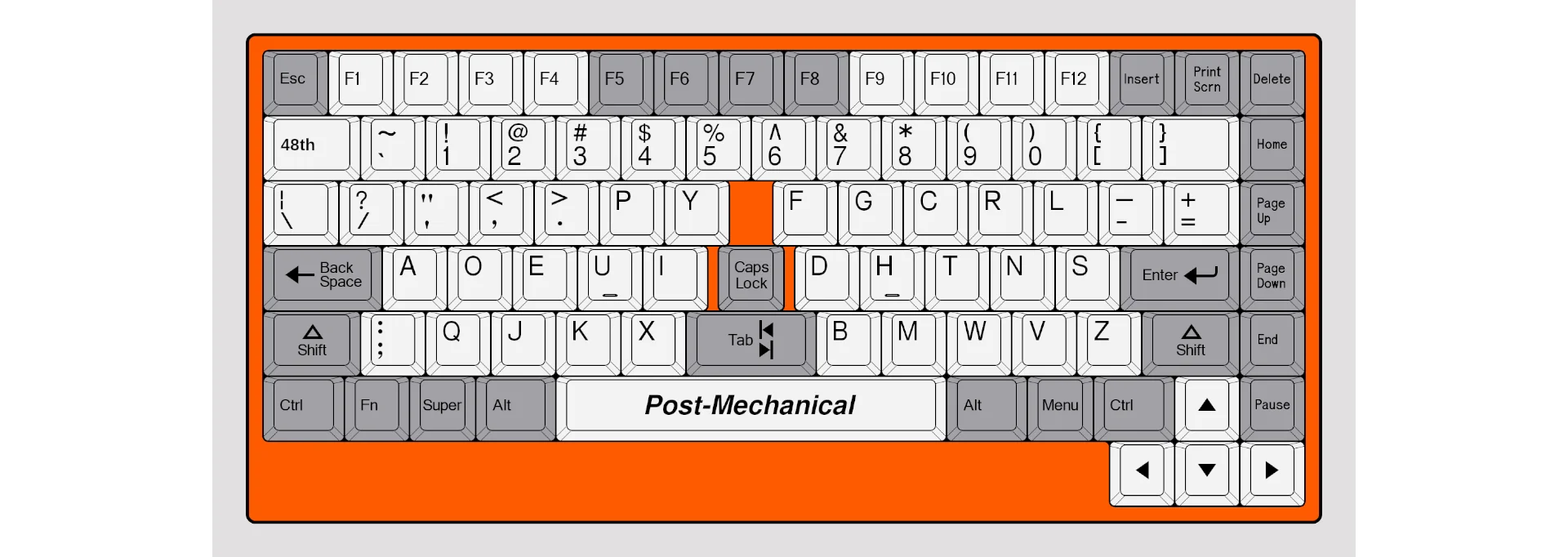
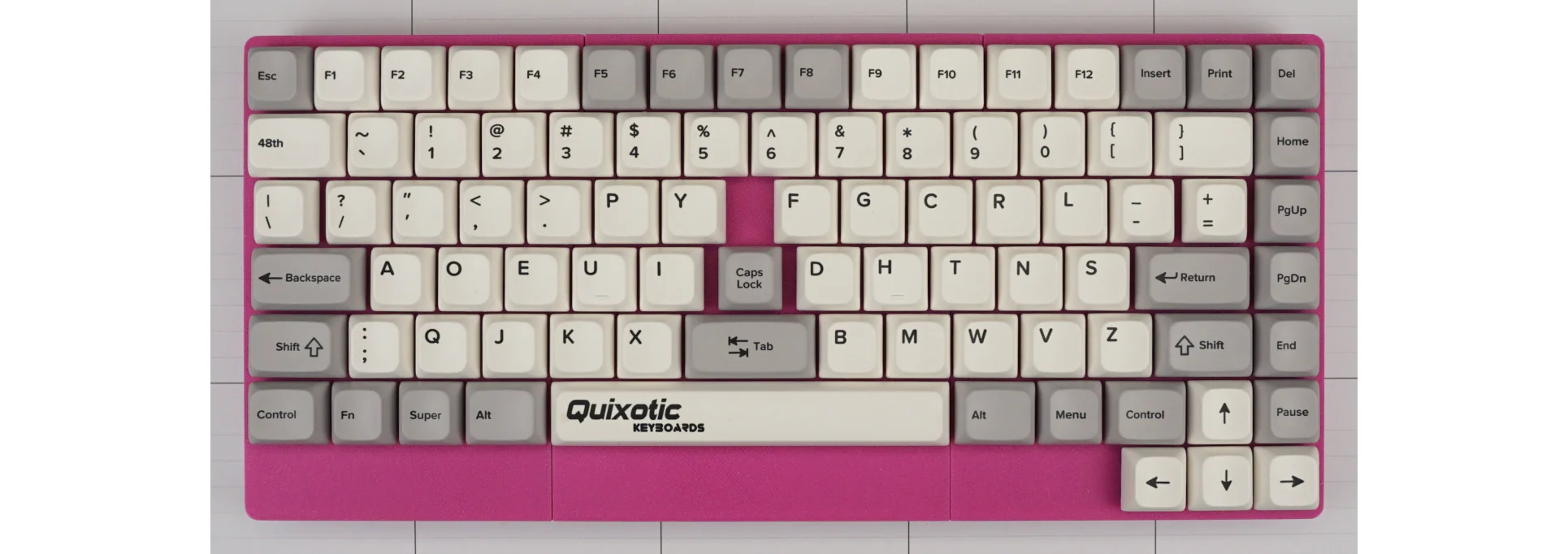
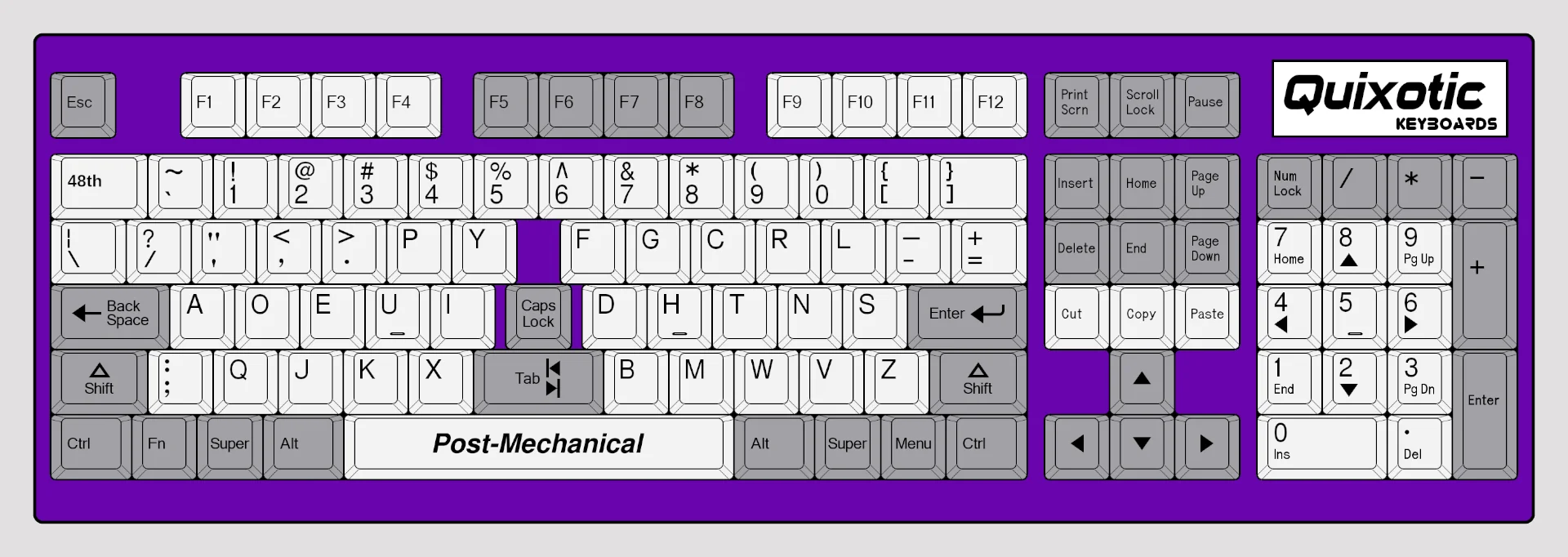
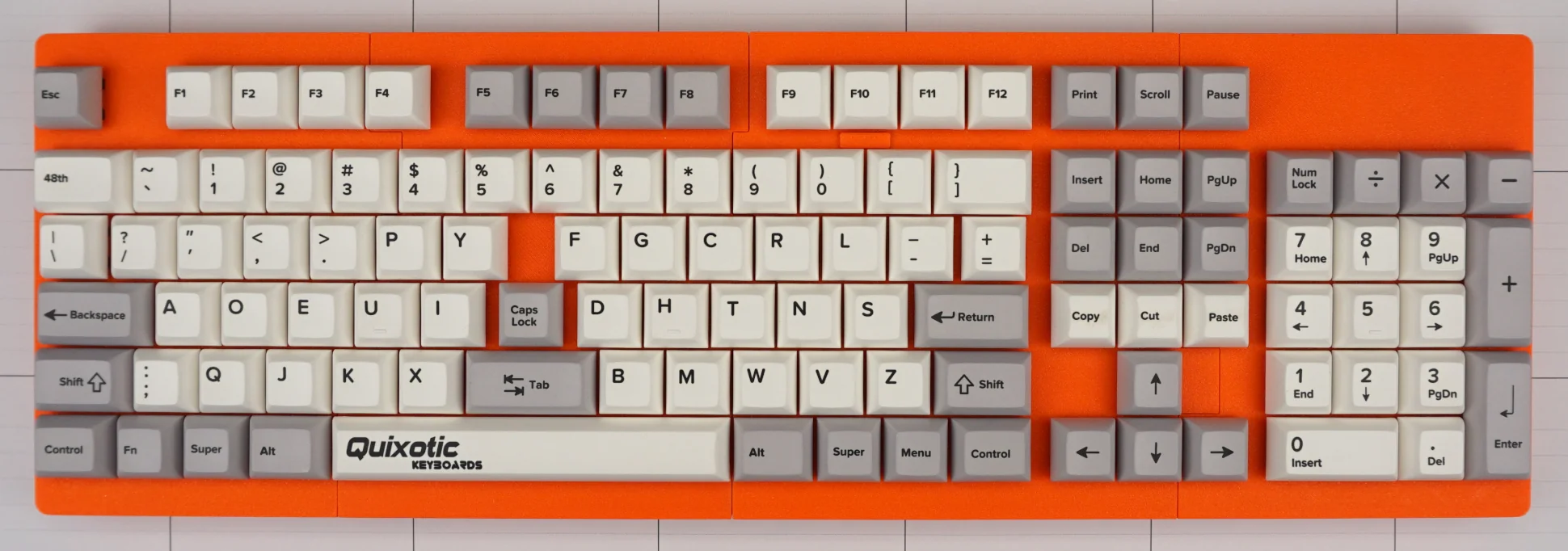
A revised typing core with neither the asymmetric monolithic character key array of the 19th-century mechanical typewriter nor the odd Qwerty letter scheme is more accurately dubbed the Post-Mechanical Writing Core.
To create the writing cores, the uneven horizontal keystagger of the mechanical typewriter was smoothed out to a uniform one-third between the four rows of character keys. That keystagger was reversed for the left-hand keys, creating a split character key array. Some carriage and character keys were relocated to create bilateral symmetry.
The numbers-row keys are in direct vertical alignment with the bottom alpha-row keys… à la post-mécanique.
The bilaterally symmetric split-array writing cores presented above have character keys positioned in two banks that contain linear oblique key columns that conform to the natural biomechanical angles of the operator’s fingers.
A writer using either of the two variants presented above will experience comfortable vertical reaches out of home-row. Fewer errors will occur due to off-center keystrokes that unwittingly actuate adjacent keys. Each hand has a more equitable number of assignments than Qwerty. The workloads of the fingers are balanced by design.
Both Post-Mechanical variants are backward compatible with the European ISO keyboard layout, which embodies forty-eight character keys. Conventional US English ANSI keyboards have just forty-seven.
The Final Verdict: The initial Testbed keyboard design is troublesome. The Final variant is the more utile design.
Ronald Earl Walker — Modern Alpha-Numeric Keyboard Designer
Post-Mechanical Writing Core Keyboards
The PC Industry Should Embrace Post-Mechanical
Previous endeavors to market ergonomic alphanumeric keyboards have produced unnecessarily complicated devices. Those ergo-keyboards are costly to manufacture; moreover, they failed to satisfy biomechanical needs.
My critique of the PC industry: Traditional alphanumeric keyboards for desktop and portable PCs were designed around a fifteen-key wide five-row deep typing core. That early keyboard footprint had no undersized keys.
A well-established trend in today’s PC industry is to produce notebook keyboards with typing cores 14.5 units wide. This skimpy real estate became the norm when a manufacturer added speakers outboard of the keyboard to a laptop PC. The keyboard was cut down to fit between the speakers. After these changes were adopted many PC manufacturers began to produce substandard laptop keyboards; desktop keyboards soon followed.
My writing instruments have a nostalgic footprint… They have full-size cursor keys. The compact variants have the bottom three keys of the cursor pad dropped below the spacebar row of the writing core… my fat fingers are thrilled with this old-school design.
My advice to the PC industry: Go back to making every key fit large fingers. Cheap solutions have produced PC keyboards with narrowed and squat keys that your customers tolerate, but do not like. Build keyboards to fit humans. Accept a new keyboard format with a dropped down cursor pad.
Although my keyboards can be truncated to fit into current notebook PC products. Future laptop PCs product lines will need to be reworked so they accept keyboards with a 15U wide writing core. A drop-down style cursor pad is mandatory, because the position of the right “Shift” key must reflect the position of the left “Shift” key; bilateral symmetry of the writing core overrides all other considerations. That is what makes it work.
Building current notebook PCs with the Post-Mechanical requires taxing compromises. A truncated 15.5U wide keyboard for laptop PC must be made to fit the substandard 15.5U hole in the deck of current laptops for 14-inch displays. Those “cropped” keyboards will have skimpy narrowed 1.25U shift keys. That truncated writing core will be appreciably more difficult to use.
Perhaps PC makers could design the next generation of full-sized laptop cases with the median line of the Post-Mechanical writing core (where the two halves of the split array meet) aligned upon the center of the monitor. There should be a choice for consumers to make:
1. Purchase a large laptop where the embedded numeric pad geometry forces the keyboard greatly off-center of the screen.
2. Purchase a large laptop that has no embedded numeric pad in the keyboard. Discrete numeric pads are very inexpensive.
How large would a laptop monitor need to be to allow centering the writing core and still contain a numeric pad?
Manufacturers need to respect human factoring above all. Lo que será, será.
Ronald Earl Walker — Highfalutin PC Keyboard Industry Mogul
Post-Mechanical Writing Cores for Other Than English
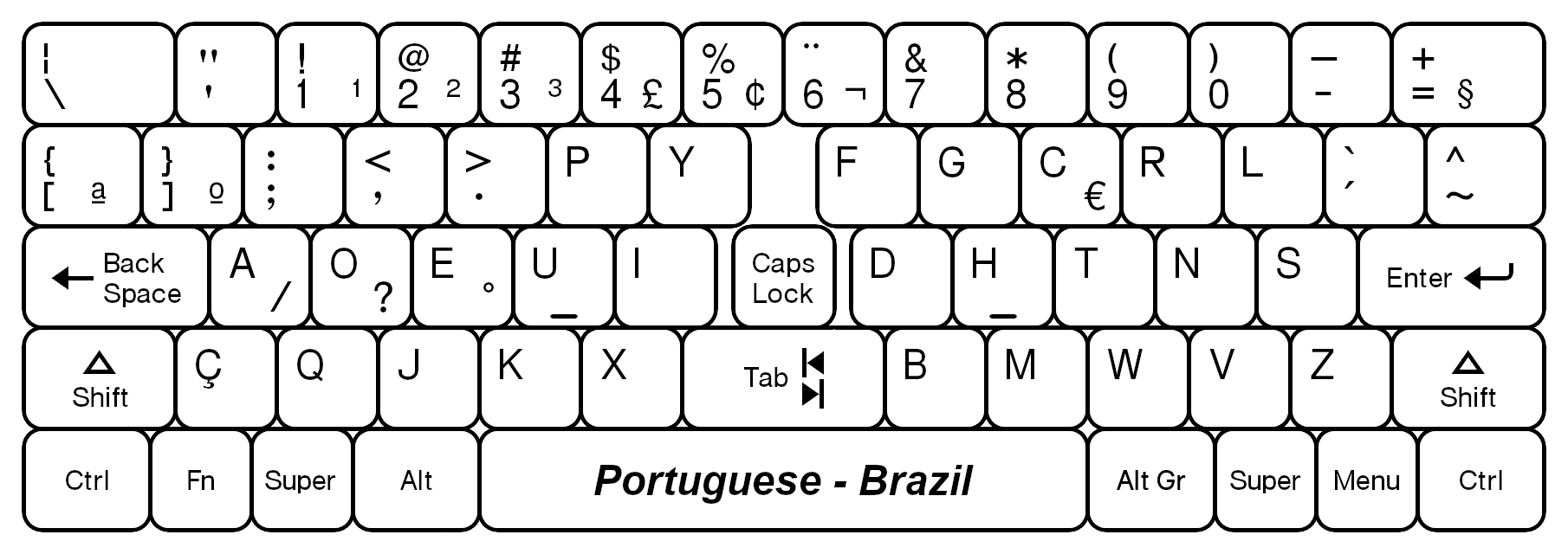
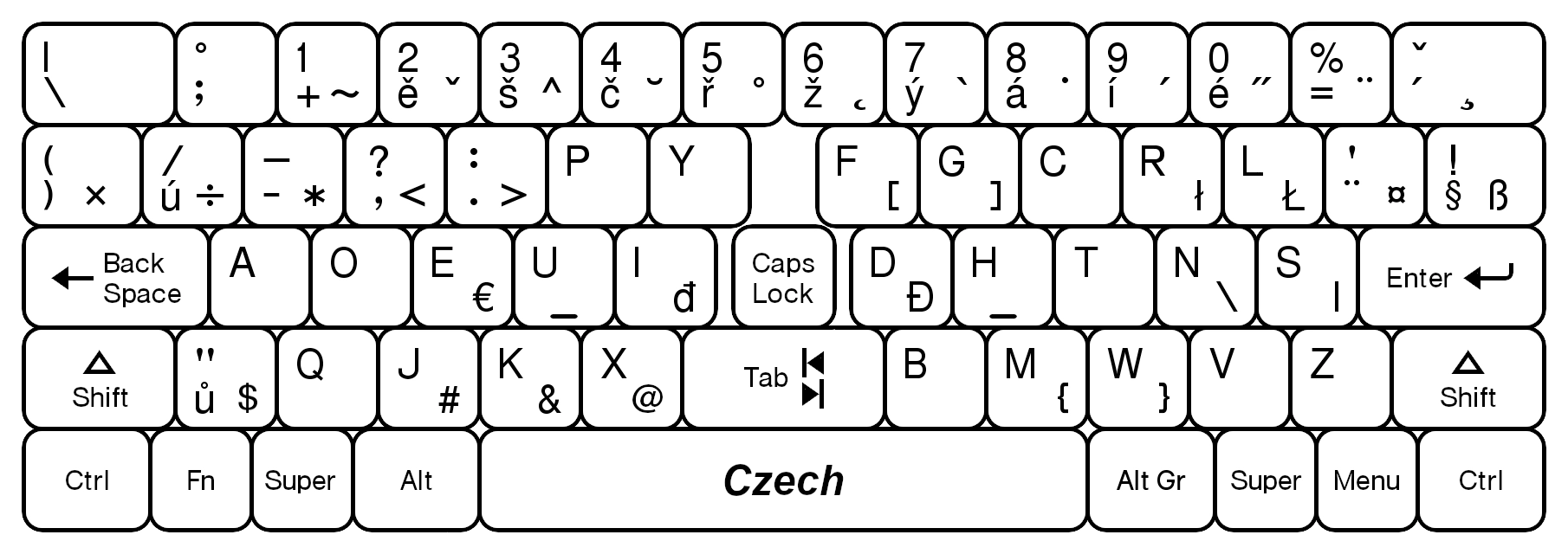

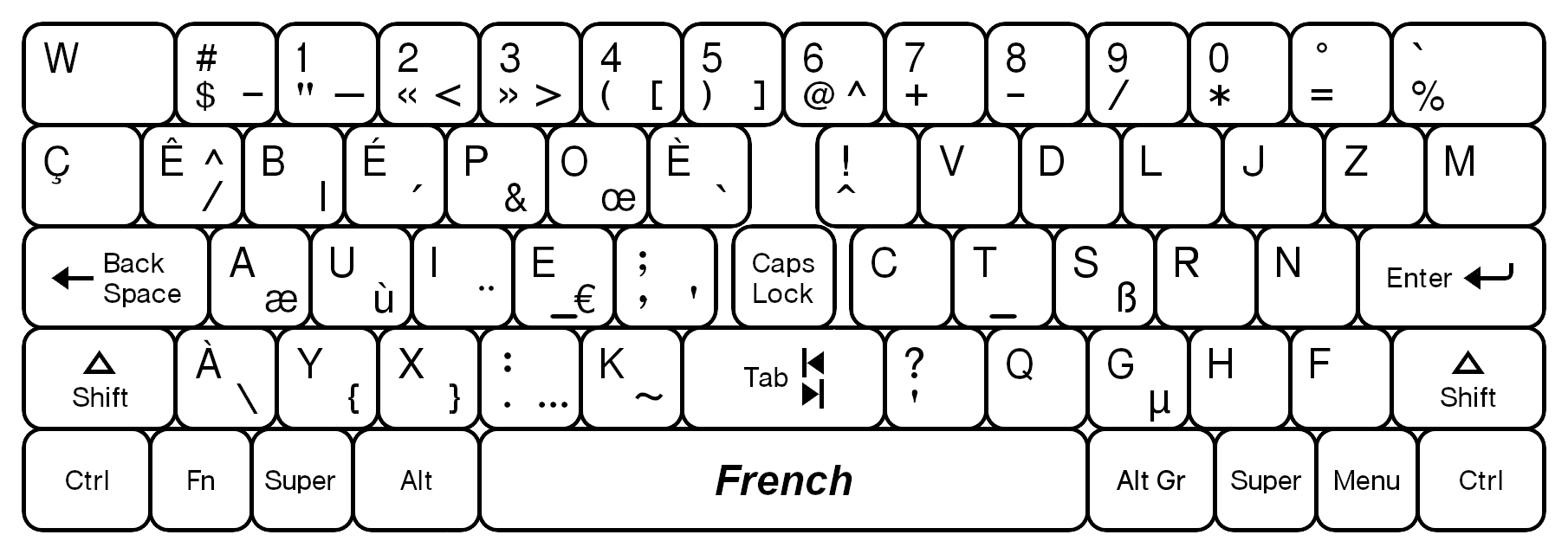
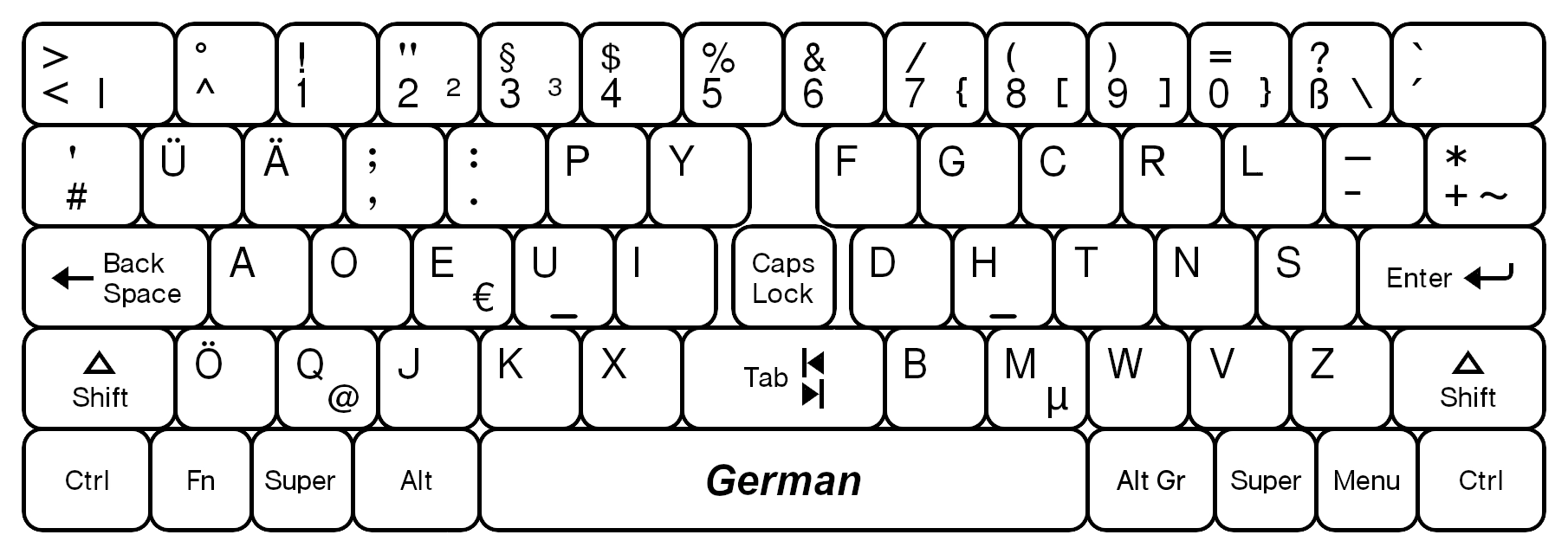
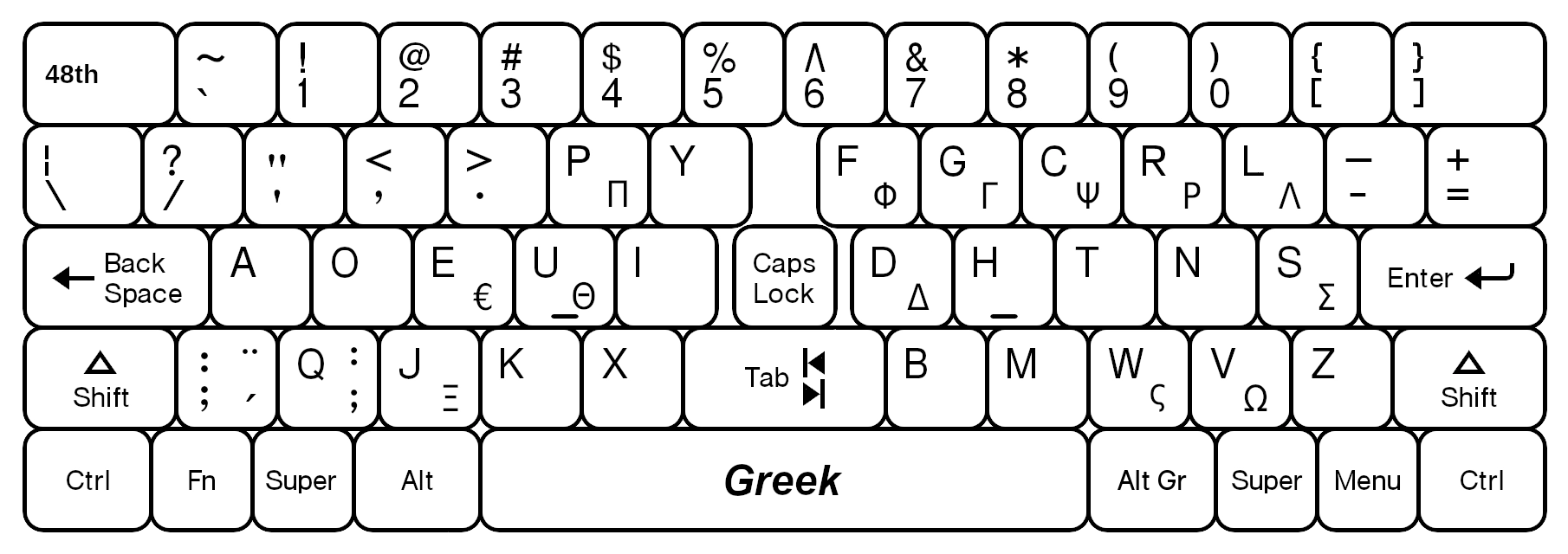
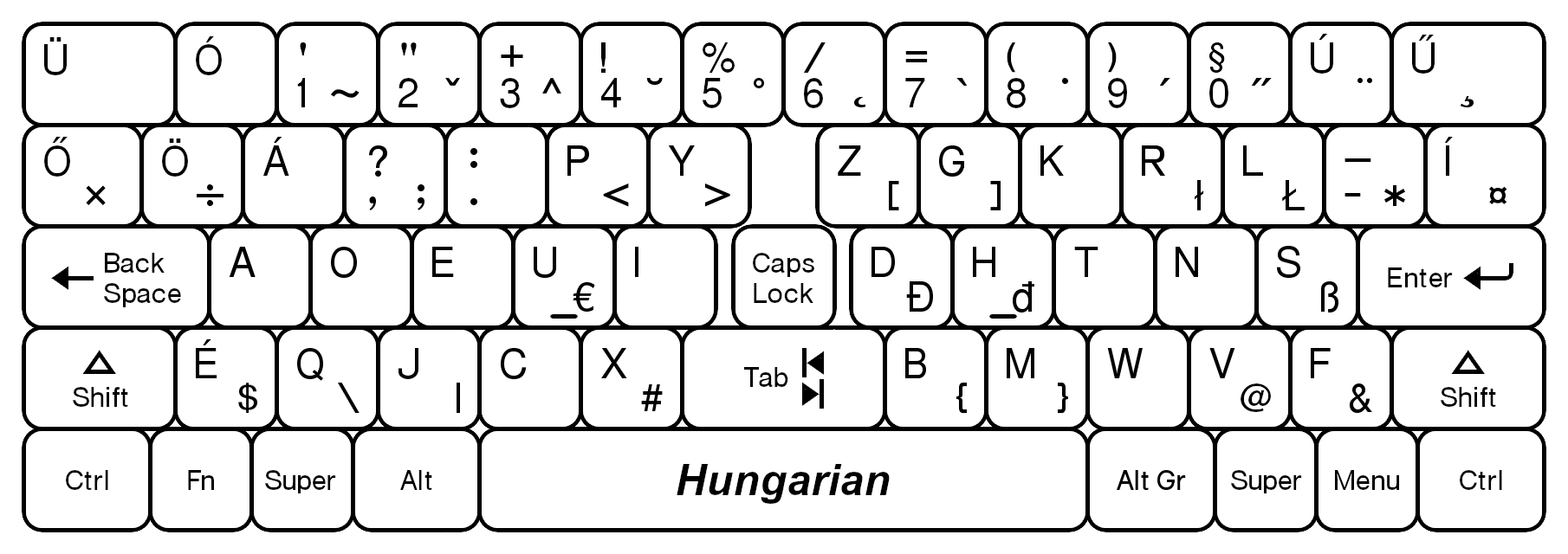
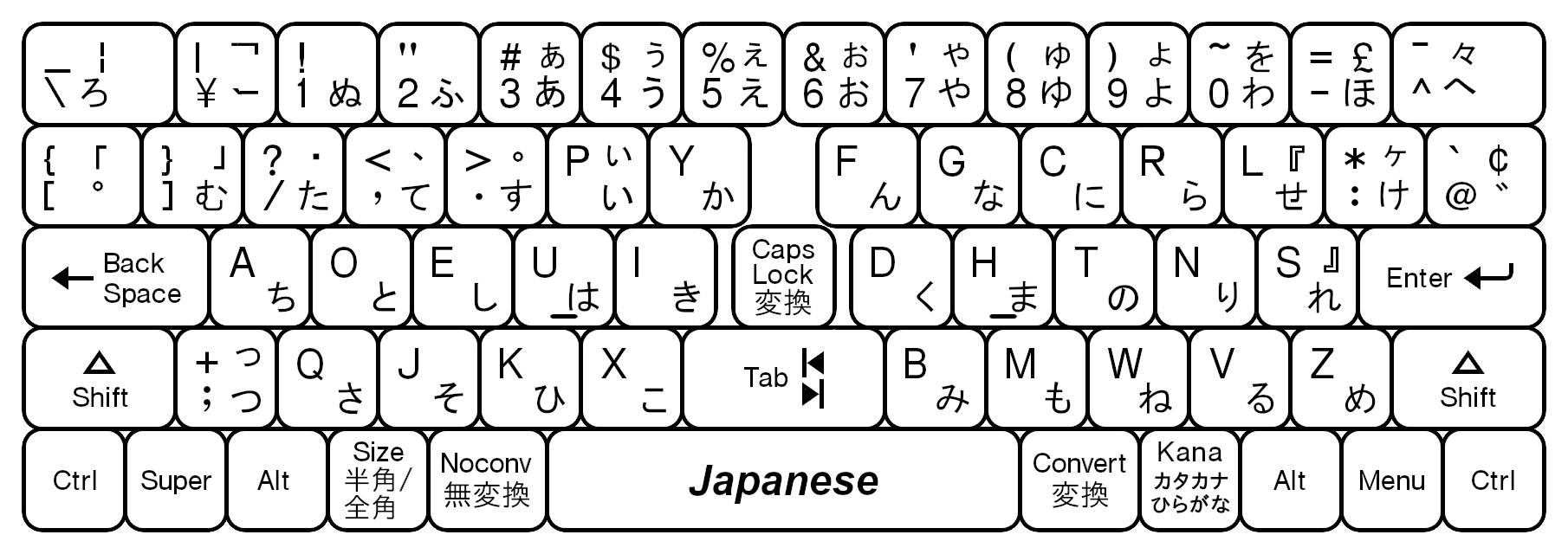
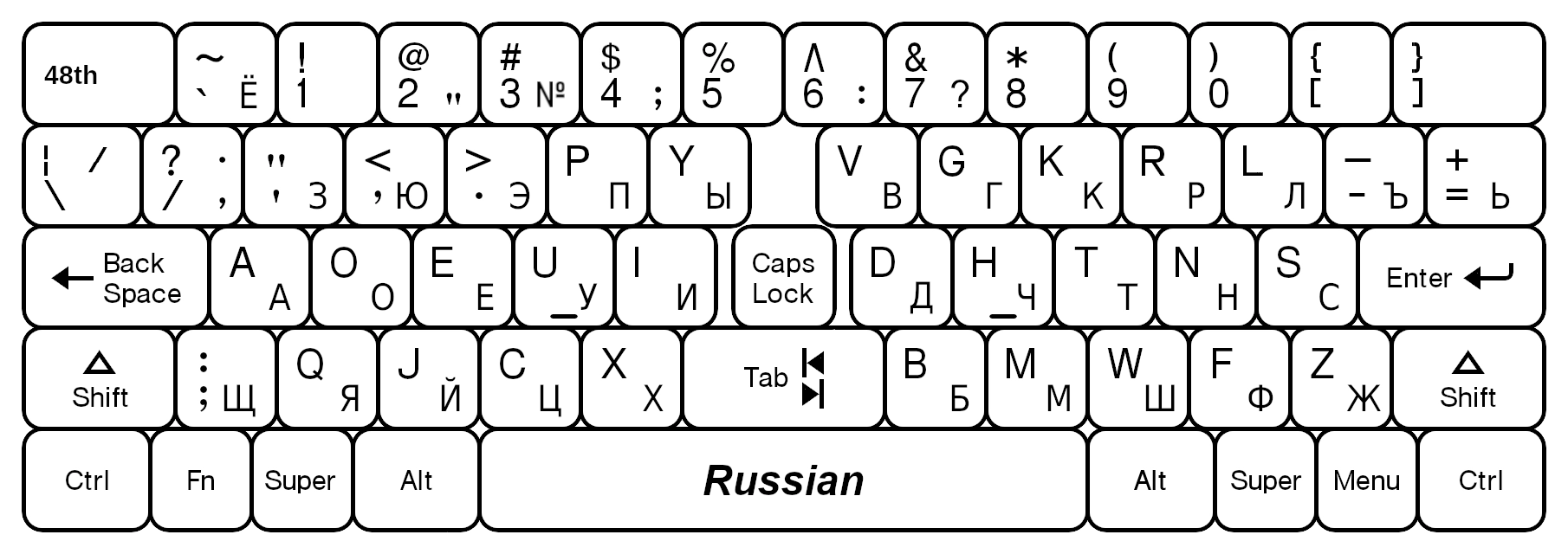
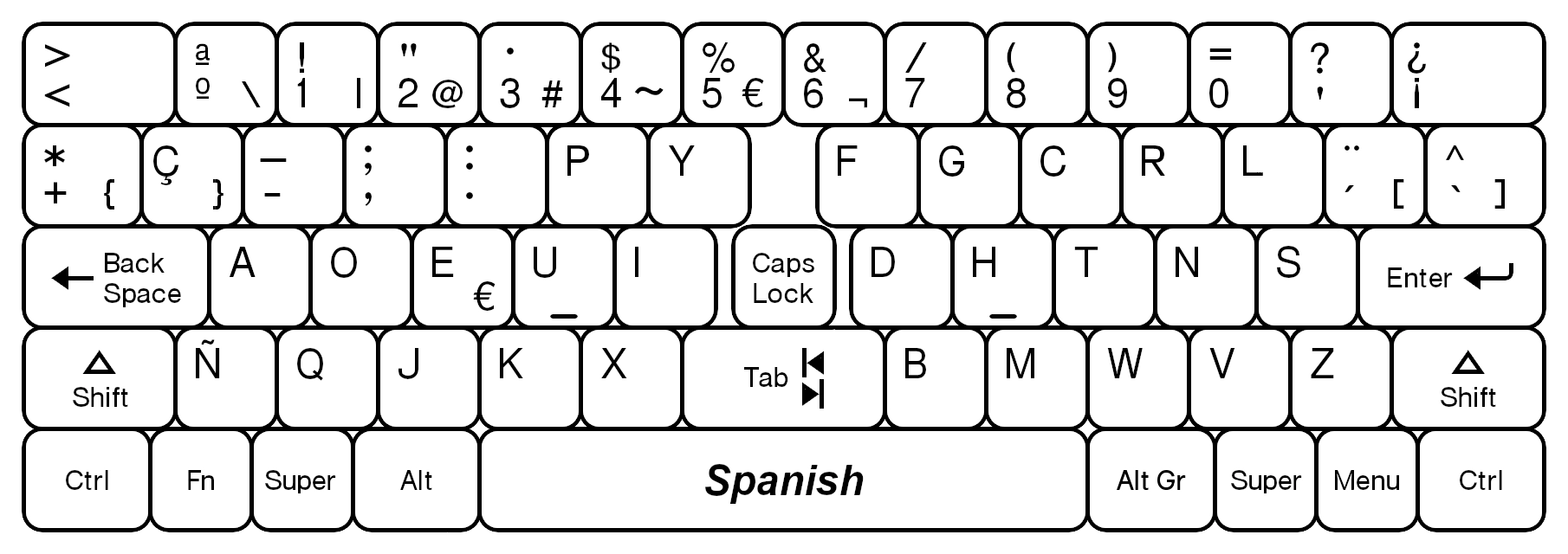
A Better Writing Instrument for Every Language
Dvorak was designed for writing English, but a writer of any language that uses the Greek, Latin or Cyrillic alphabet will be better served by Dvorak than Qwerty. Writers that use any script devised by humans will be better served by Post-Mechanical keyboard geometry. Mechanical typewriter keyboard geometry causes repetitive stress injury.
All of my designs for the US market are plug-n-play, hardwired to use the US English (Qwerty) keyboard driver.
Inside of my writerz-with-an-attitude GitHub project you will find the files needed to build any of my keyboards, in Dvorak. I do not build abominations. Don’t attempt to straddle the fence. You cannot make of it what you will.
The project contains the KiCad PCB design files, PCB gerber files, KMK firmware files, OpenSCAD keyboard case design files, 3D printing model files, and a link to my custom KiCad library.
Guidance: Select the “GitHub Repository” button below. Inside of my GitHub project, select the green Code button, then select “Download ZIP” to grab all the current files created for this project, including those needed to build any of my keyboards.
In late 2023 there were no keycap sets available for my unique keyboards. I began making keyboards by using large (over 130 piece) XDA, or similar uniform profile Qwerty keycap sets as best I could. The real trick was finding a 6U spacebar. Keyboard stickers were used to relabel keycaps as needed. The resulting keyboards are satisfying.
In May of 2025 I found YUZU Custom Keycaps. Now I build keyboards using custom keycap sets of my own design.
The Dvorak letter scheme is good for writing any Other-Than-English language. English is the most useful second language on earth. Any OTE language keyboard that uses Dvorak scheme is an innate bi-lingual masterpiece.
My keyboards are designed to supersede the conventional Universal typewriter standard. They can be adapted to serve writers in every region of the world. New drivers for Windows, MacOS, and Linux will be required so Alt Gr characters can be relocated to logical locations within the Dvorak scheme.
On 15 Aug 2026 I built a Spanish (Spain) and French BÉPO keyboards using keycap sets from YUZU. I designed a keycap set for Portuguese (Brazil). That keyboard was built in August.
Disclaimer: Several of the following OTE keyboards presented below are variants of the straight Dvorak. A few letters are swapped around to make the instrument more efficient for writing that unique language. Modifications to the Dvorak scheme for foreign keyboards is not preferred now by myself. English is the most preferred “common” second language.
Children, living anywhere in the world should not be forced into the 152-year-old mechanical typewriter tradition. In a perfect world, future generations of writers will cease using the word type as a substitute for the word write.
Ronald Earl Walker — Unabashed Qwerty Killer
The Post-Mechanical Keyboard Documentation Library
Printed Circuit Board (PCB) Choose 1 of 5 variants 1 each
Cherry MX2A switches 60%/Compact/Maximus 63/87/109 each
1N4148 diodes, D0-35 60%/Compact/Maximus 63/87/109 each
LED 3mm 2.2V, Red or Green 60%/Compact/Maximus 3/1/2 each
Resistor 68 Ohm, 1/4W axial 60%/Compact/Maximus 3/1/2 each
Elite-Pi controller Headers are included 1 each
KAM keycap set design and order from yuzukeycaps.com 1 each
Or… buy a cheap keycap set and use keyboard stickers:
XDA keycap set (over 130 pcs) White, with four 1.5U and four 1.25U keys 1 set
Keyboard stickers, replacement (rare) Black letters/White background 1 set
XDA spacebar 6U (rare) Any color available, offset or centered stem 1 each
Cherry OEM PCB stabilizer 6U (rare) All variants, clip-in 1 each
Cherry OEM PCB stab 2U 2-Hnd Cmp or 60%/Single-Hand or Maximus 1/4 each
Keyboard case sections (3D printed parts) PETG filament 1 set
M3-12mm flat head screws, case top 0%/Compact/Maximus 12/12/16 each
M3-18mm socket head screws, case bottom 0%/Compact/Maximus 2/2/4 each
Soldering iron/station digital display, for good temperature control 1 each
Lead-free rosin core solder, RoHS Sn99 Ag0.3 Cu0.7 0.6/0.8mm thick 1 roll
Desolderng wick, RoHS to remove solder 1 roll
Rosin paste flux with solder, RoHS aid to keep the soldering iron tip tinned 1 can
Liquid solder flux, RoHS aid for lead-free soldering/desoldering 1 bottle
Solder fume extractor for the health of your lungs 1 each
2.5mm ball-end hex key (or screwdriver ) for case bottom assembly 1 each
2mm hex key (or screwdriver ) for case top assembly 1 each
Electronic breadboard fixture to hold the µP headers square while soldering 1 each
USB-A to type C data cable 90-degree C plug preferred 1 each
Ronald Earl Walker — Itemizer-In-Chief
Rework Guide with a Materials Source List
Rework: Removing a thru-hole part is difficult. I tore up a PCB trying to desolder a microcontroller, so I purchased an electric desoldering iron/solder sucker. Hint: Ream-out the throat and clean the sucker barrel out regularly , lubricating the sucker’s O-ring. Keep spare tips, they wear out very often.
Note: It is near impossible to clear solder out of a thru-hole using solder wick. An affordable electric manual solder sucker can be used well-enough. An all too expensive motorized electric solder sucker will work a lot easier.
Use the soldering iron to melt the connection and gently pull the part out. Then add fresh solder to the thru-hole.
Use the solder sucker to clear the hole. Do not press the tip down hard/slide around, that will tear pads from a PCB.
Changing out a microcontroller without damaging the PCB is possible. The sensible thing to do is hacksaw through the standoffs using a compact blade holder. Then (securing the board in a fixture) use the solder iron and tweezers to remove the cut pins from the PCB. An electric solder sucker can then be used to clear out the thru-holes.
Finding Uncommon Parts
1. PCBs for any of my five keyboard variants… PCBWay. The Gerber files needed to order a PCB are found inside my PCBWay+ projects. Note: The links below lead to the Two-Hand variants. Links to the Single-Hand variants are found on the next page.
2. The 6U Original Cherry stabilizer PCB mounted… Flashquark… Amazon.
3. Elite-Pi micro-controller by Maple Computing … Keebio in the US… Mechboards in the UK.
4. Keyboard stickers, replacement with white background… www.4keyboard.com… expensive.
Alternative: Buy a thermal label printer, such as the Epson LW-PX800 and make exactly what you need.
Best Alternative: Design and order a custom dye-sublimation keycap set from Yuzu.
The Most Difficult Part to Obtain
The 6U XDA profile spacebar. The history of this odd-sized keycap is not known to me. I believe the first 6U spacebar marketed was built with a 1/2U offset of the stem. The first ones I bought came with a large KDB Fans keycap set and had a dual stem: centered and offset (nearly XDA profile).
The only source that I have found for XDA 6U spacebars is:
1. The 6U XDA profile spacebar… Amazon, YMDK XDA convex spacebar, grey (with off-set stem).
Ronald Earl Walker — Soldering Rework Coach